Using the Plugin
Every Steam Web API interface is a Game Instance Subsystem, for example Web Steam User for ISteamUser and Web Leaderboards for ISteamLeaderboards. Each function sends one request to Steam and returns the JSON response.
You can call a function in two ways. Both send the same request. A few interfaces, such as Web Game Servers Service and Web Published File Service, only have subsystem functions.
Async nodes
Right-click in a Blueprint graph and search for the function name, for example Get Player Summaries. The async nodes are in the SteamCoreWeb → Interface → Async categories.
When Steam responds, the node fires its output with two values:
- Data: the response from Steam as a JSON string.
- Was Successful: true if the request reached Steam and Steam returned a response.
Subsystem functions
Get the subsystem, for example Get Web Steam User, and call the function on it. Connect a custom event to Callback. The event gets the same Data and Was Successful values.
Use this when you want to handle the response in a separate event, or when you call the function from a place that can't have async nodes, such as a function graph.
Making a call
Most functions take the publisher key as their first input. Connect Get Project Key to it, and Get Project App ID to the App ID input where there is one.
This example gets the friend list of the Dev Steam ID, finds all steamid values in the response, and passes them on to Get Player Summaries:
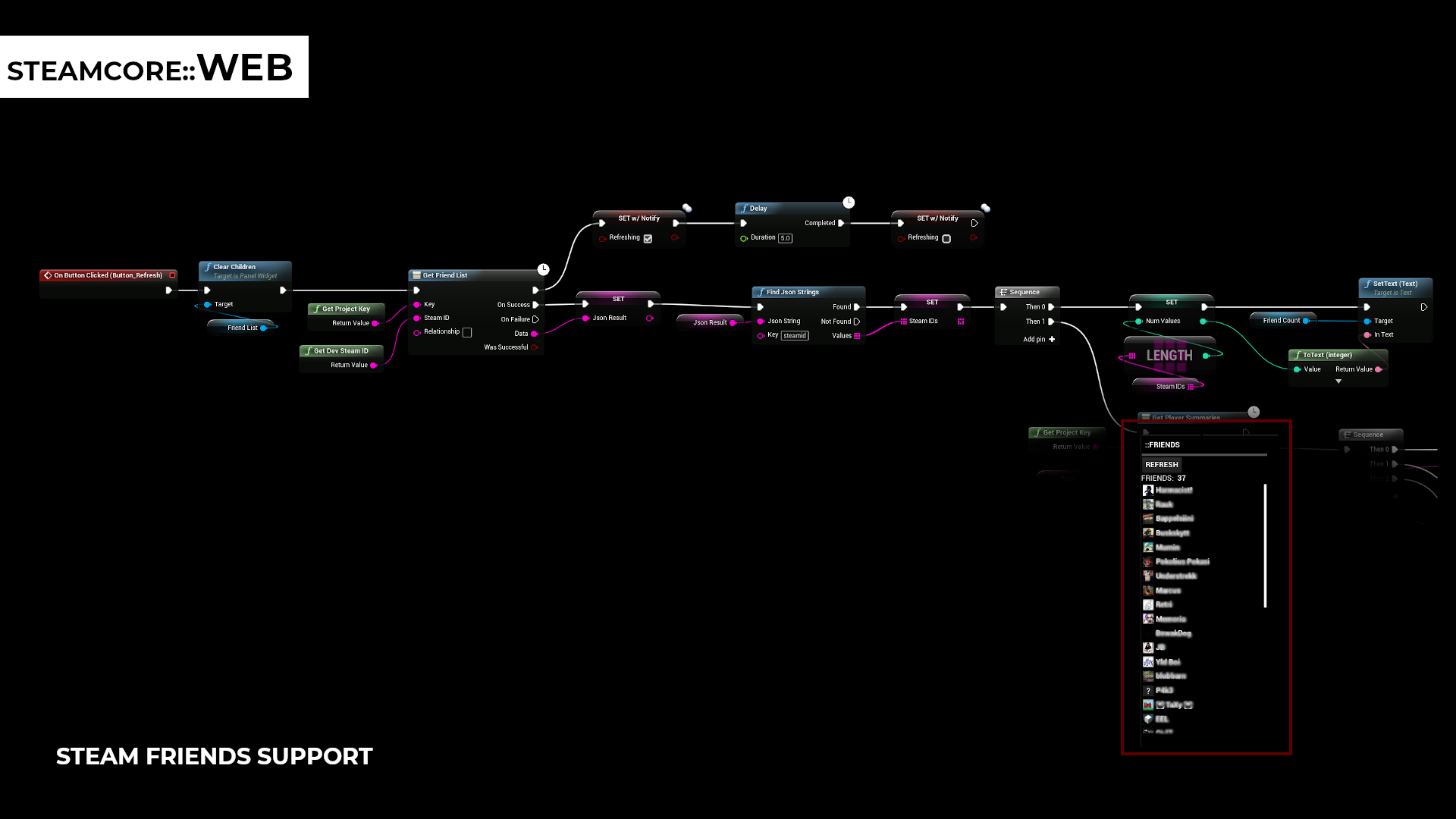
Reading the response
The response is the JSON that Steam returns. Use the JSON helpers to read values from it:
- Find Json String, Find Json Number and Find Json Bool return the first value with the given key.
- Find Json Strings, Find Json Numbers and Find Json Bools return every value with the given key, for example every
steamidin a friend list.
The key is not case sensitive, and the helpers search the whole response, including nested objects and arrays.
You can also parse Data with any JSON plugin, or with FJsonSerializer in C++.
Was Successful only tells you that Steam responded. Steam can respond with an error, so check the response as well. Many interfaces return "result": 1 on success, and an error or errordesc field on failure.
Calling from C++
See C++ API.