Reference
Settings
The settings are in Edit → Project Settings → Game → SteamCoreWeb Plugin, and are saved to Config/DefaultEngine.ini under [/Script/SteamCoreWeb.SteamCoreWebSettings].
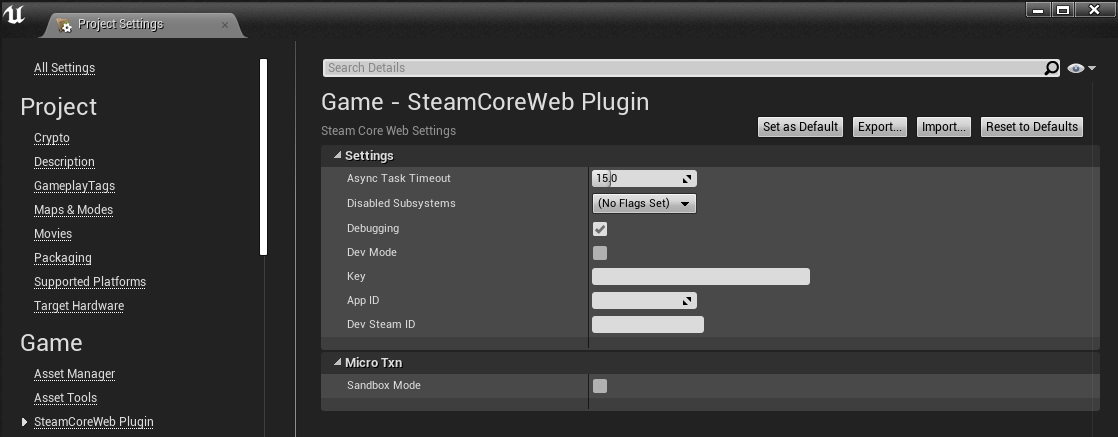
Settings
| Setting | Default | Description |
|---|---|---|
| Async Task Timeout | 15.0 | Seconds before a request that Steam hasn't answered is cancelled. The callback is then called with Was Successful false. Between 5 and 60. |
| Disabled Subsystems | None | Subsystems that are never created. Disable the interfaces you don't use. |
| Debugging | Off | Logs every request and response. The key is masked as key=***. |
| Dev Mode | Off | Logs the requests without sending them. Turn on Debugging as well to see them. |
| Key | Empty | Your Steamworks Web API publisher key. Returned by Get Project Key. Read Publisher Key Security before you set it. |
| App ID | 480 | Your app's ID. Returned by Get Project App ID. |
| Dev Steam ID | Empty | A Steam ID to use while developing. Returned by Get Dev Steam ID. |
Micro Txn
| Setting | Default | Description |
|---|---|---|
| Sandbox Mode | Off | Uses ISteamMicroTxnSandbox instead of ISteamMicroTxn. It works the same way, but no real transactions take place. See Microtransactions. |
Example
[/Script/SteamCoreWeb.SteamCoreWebSettings]
AppID=480
DevSteamID=76561197960287930
bSandboxMode=True
bDebugging=False
bDevMode=False
AsyncTaskTimeout=15.0
Key on the command line or in an environment variable
Get Project Key checks these sources in order and returns the first one that is set:
| Source | Example |
|---|---|
| Command line | -SteamCoreWebKey=<your key> |
| Environment variable | STEAMCOREWEB_KEY=<your key> |
| Project Settings | Key |
Use the command line or the environment variable on your server, so the key never has to be in the project files.